Azure Batch API: Your Secret Weapon for Parallel Management Operations
Stop waiting around for your Azure management scripts to finish. By combining Azure Batch API with Management API calls, you can process multiple operations simultaneously and supercharge your cloud automation workflows. Here's how to get started.
Introduction
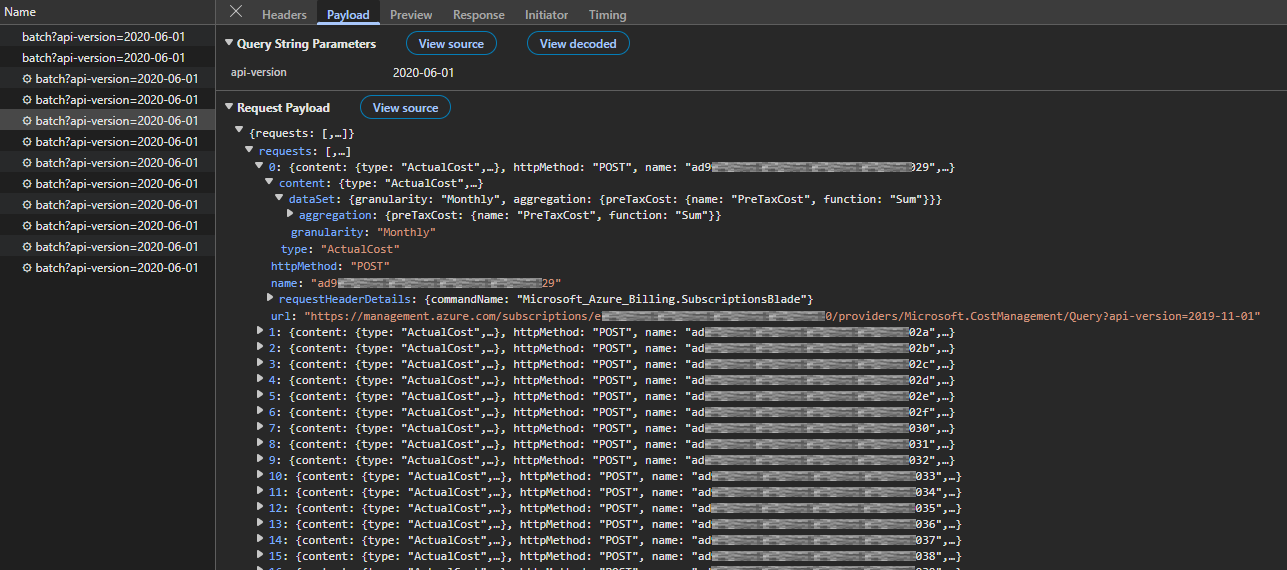
Ever wondered how the Azure Portal loads data from dozens of different management endpoints simultaneously? When you navigate to the subscription blade, it instantly displays costs, your roles, resource counts, and more across potentially hundreds of subscriptions. Behind the scenes, this requires orchestrating numerous API calls efficiently.
I recently encountered this challenge while building an automation workflow that needed to retrieve Privileged Identity Management (PIM) assignments across the Azure estate. During testing with 100+ subscriptions, the iterative approach was painfully slow, taking over 7 minutes to complete. While PowerShell threading could help, it still meant managing parallel execution locally with all its complexities: connection pooling, rate limit coordination, and error handling across multiple threads.
This led me to an intriguing question: how does Azure itself handle querying multiple management endpoints at scale? The answer turned out to be an underdocumented gem: the Azure Batch API endpoint - a management plane feature specifically designed for parallel API operations.
The Endpoint
At first glance, you might assume the batch endpoint is related to the Azure Batch Service - a platform for running large-scale parallel and high-performance computing workloads. However, that’s not the case here. The Azure Batch API I’m referring to is actually a management plane endpoint, designed specifically for handling multiple Azure Resource Manager (ARM) requests simultaneously.
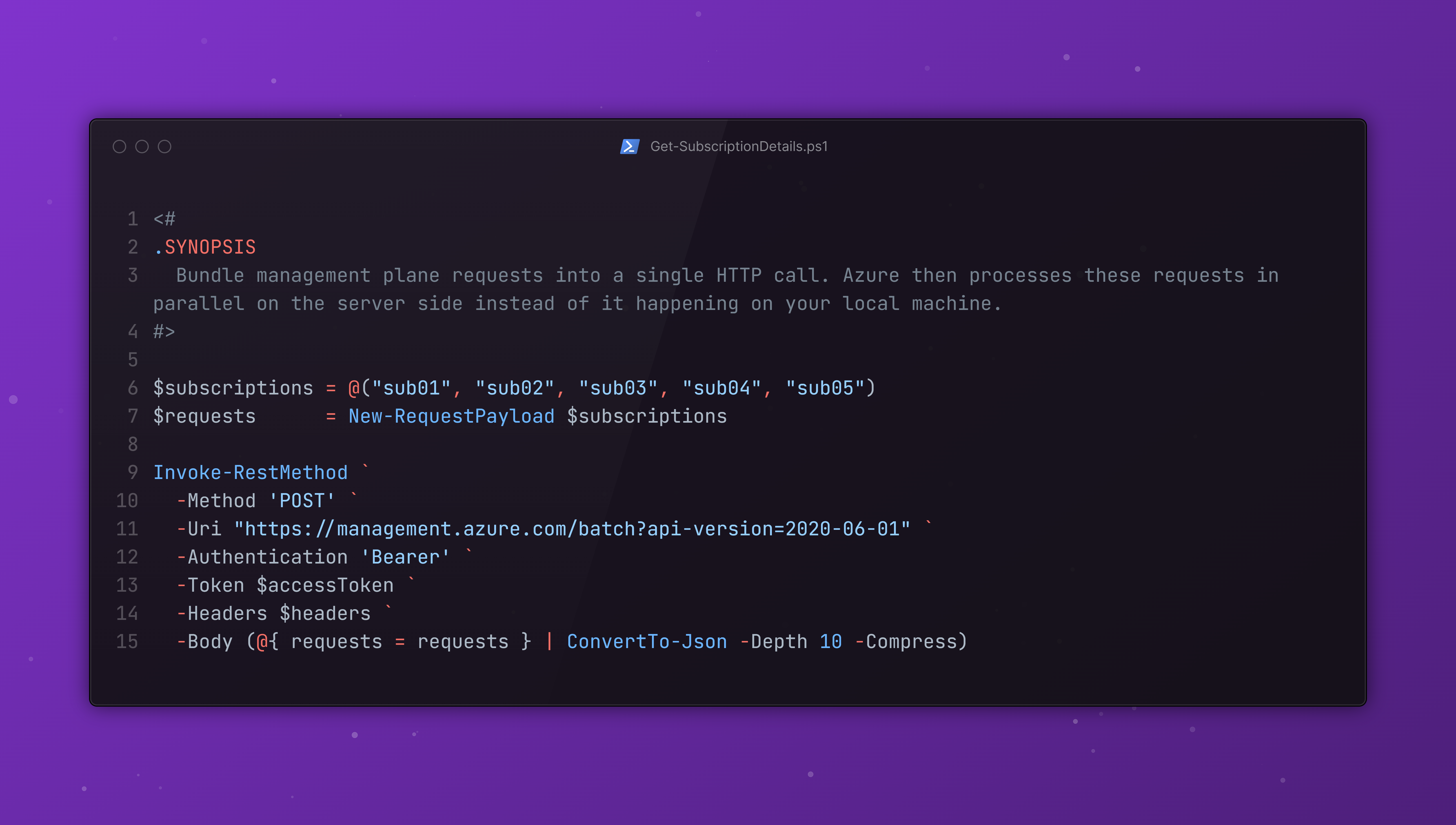
So what does this mean in practice? Instead of sending individual API calls one by one and waiting for each response before moving on to the next, you can bundle management plane requests into a single HTTP call. Azure then processes these requests in parallel on the server side and returns all the responses together in a single payload.
The biggest advantage here is that the parallelization happens entirely on Azure’s infrastructure instead of it happening on your local machine. This means you don’t need to worry about:
- Managing threads or async patterns in your code
- Handling rate limits across multiple concurrent connections
- Orchestrating parallel requests and aggregating responses
- Dealing with connection pooling overhead
You simply send one batch request, and Azure does the heavy lifting. Each request in the batch is processed independently, so even if one fails, the others will complete successfully.
Interacting with the Batch API
The endpoint itself is straightforward to use. Here’s the structure of a batch request:
1
2
3
4
5
6
7
8
9
10
11
12
13
14
15
16
17
18
19
20
21
22
23
24
25
26
27
28
29
30
31
32
33
34
35
36
37
38
39
40
POST https://management.azure.com/batch?api-version=2020-06-01
Content-Type: application/json
Authorization: Bearer ***

{
  "requests": [
    {
      "httpMethod": "GET",
      "name": "request-1",
      "url": "/subscriptions/{guid}/providers/Microsoft.Authorization/roleEligibilityScheduleInstances?api-version=2020-10-01"
    },
    {
      "httpMethod": "GET",
      "name": "request-2",
      "url": "/subscriptions/{guid}/providers/Microsoft.Authorization/roleEligibilityScheduleInstances?api-version=2020-10-01"
    },
    {
      "httpMethod": "GET",
      "name": "request-3",
      "url": "/subscriptions/{guid}/providers/Microsoft.Authorization/roleEligibilityScheduleInstances?api-version=2020-10-01"
    },
    {
      "httpMethod": "POST",
      "name": "request-4",
      "url": "/subscriptions/{guid}/providers/Microsoft.CostManagement/Query?api-version=2019-11-01",
      "content": {
        "type": "ActualCost",
        "dataSet": {
          "granularity": "Monthly",
          "aggregation": {
            "preTaxCost": {
              "name": "PreTaxCost",
              "function": "Sum"
            }
          }
        }
      }
    }
  ]
}
Key elements of the request structure:
httpMethod: The HTTP verb (GET, POST, PUT, PATCH, DELETE)name: A unique identifier for tracking this specific request in the responseurl: The relative ARM API path (omithttps://management.azure.com)content(optional): The request body for POST/PUT/PATCH operations
Note that the url field can be relative to the management endpoint and you don’t have to include the full URL, just the path starting with /subscriptions/... or /providers/....
Response structure:
1
2
3
4
5
6
7
8
9
10
11
12
13
14
15
16
17
18
19
20
21
22
23
24
25
26
27
28
{
  "responses": [
    {
      "name": "{guid}",
      "httpStatusCode": 200,
      "headers": {
        "Access-Control-Allow-Origin": "*",
        "Access-Control-Allow-Methods": "POST, PUT, DELETE, GET, OPTIONS, PATCH",
        ...
        "x-ms-ratelimit-remaining-subscription-reads": "249"
      },
      "content": "{actual response payload from the request}",
      "contentLength": 10211
    },
    {
      "name": "{guid}",
      "httpStatusCode": 200,
      "headers": {
        "Access-Control-Allow-Origin": "*",
        "Access-Control-Allow-Methods": "POST, PUT, DELETE, GET, OPTIONS, PATCH",
        ...
        "x-ms-ratelimit-remaining-subscription-reads": "249"
      },
      "content": "{actual response payload from the request}",
      "contentLength": 9426
    }
  ]
}
Important notes about the response:
- Each response maintains the
nameyou assigned in the request, making it easy to correlate responses - The
httpStatusCodereflects the status of that individual request - not the batch operation itself - The batch API call returns HTTP 200 even if individual requests fail; you must check each response’s status
Practical Implementation
Here’s a PowerShell example that demonstrates how to obtain PIM assignments across multiple subscriptions efficiently. This script handles authentication, batching, and progress tracking:
1
2
3
4
5
6
7
8
9
10
11
12
13
14
15
16
17
18
19
20
21
22
23
24
25
26
27
28
29
30
31
32
33
34
35
36
37
38
39
40
41
42
43
44
45
46
47
48
49
50
51
52
53
54
55
56
57
58
59
function Invoke-AzBatchRequest {
    $stopwatch = [System.Diagnostics.Stopwatch]::StartNew()
    Write-Host "Commencing script..." -ForegroundColor Cyan
    $accessToken = ConvertTo-SecureString (az account get-access-token --resource https://management.azure.com --query accessToken --output tsv) -AsPlainText
    $requestUrl = "https://management.azure.com/batch?api-version=2020-06-01"
    $headers = @{
        'Content-Type' = 'application/json'
    }

    # Get available subscriptions
    $subscriptions = (az account subscription list --query [].subscriptionId -o tsv --only-show-errors) # | Select-Object -First 3
    Write-Host "Found $($subscriptions.Count) subscription(s)" -ForegroundColor Green

    # Compose the payload
    $requests = $subscriptions | ForEach-Object {
        @{
            httpMethod = "GET"
            url        = "/subscriptions/$_/providers/Microsoft.Authorization/roleEligibilityScheduleInstances?api-version=2020-10-01"
            name       = $_
        }
    }

    # Process the request in batches
    $batchSize = 15
    $responses = [System.Collections.Generic.List[object]]::new()
    $totalBatches = [Math]::Ceiling($requests.Count / $batchSize)

    Write-Host "Processing batches.. | Batch size: $batchSize; Total batches: $totalBatches" -ForegroundColor Cyan
    for ($i = 0; $i -lt $requests.Count; $i += $batchSize) {
        $batchNumber = [Math]::Floor($i / $batchSize) + 1
        Write-Progress -Activity "Processing batch requests" -Status "Batch $batchNumber of $totalBatches" -PercentComplete (($batchNumber / $totalBatches) * 100)

        $endIndex = [Math]::Min($i + $batchSize - 1, $requests.Count - 1)
        $chunk = $requests[$i..$endIndex]

        $batchResponse = Invoke-RestMethod `
            -Method 'POST' `
            -Uri $requestUrl `
            -Authentication 'Bearer' `
            -Token $accessToken `
            -Headers $headers `
            -Body (@{ requests = $chunk } | ConvertTo-Json -Depth 10 -Compress)

        if ($LASTEXITCODE -ne 0) {
            Write-Warning "Batch request failed: $batchResponse"
            continue
        }

        $batchResponse | ForEach-Object { $responses.Add($_) }
    }

    Write-Progress -Activity "Processing batch requests" -Completed

    $stopwatch.Stop()
    Write-Host "`nRequests complete!" -ForegroundColor Green
    Write-Host "Duration: $($stopwatch.Elapsed.ToString('mm\:ss'))" -ForegroundColor Gray

    return $responses
}
Rather than sending all requests at once (which could hit API limits), the script processes them in chunks of 15 requests.
Note on batch size selection: The batch size of 15 was chosen strategically to balance performance with API behavior. When batch payloads exceed a certain size, the Azure Batch API returns a 201 Accepted status code instead of 200 OK, along with a location header pointing to a URL where the results can be retrieved via a subsequent GET request. By keeping batches smaller, we avoid this two-step process entirely, simplifying the implementation while also reducing the likelihood of encountering 429 Too Many Requests throttling errors.
The script:
- Indicates progress and displays it to the user with
Write-Progress - Sends the batch to Azure’s batch endpoint using
Invoke-RestMethodwith bearer token authentication - Collects the responses and adds them to a consolidated list for further processing

This approach balances throughput with API limits, ensuring efficient processing without overwhelming the service.
Performance Impact
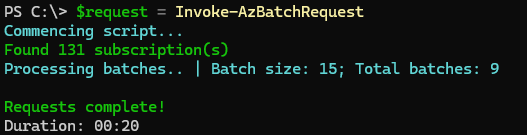
I was able to get the duration down to 20 seconds, from the original 7 minutes. That’s a 95%+ reduction in execution time for querying 100+ subscriptions.
Production Considerations
While the performance improvement is substantial, production implementations require additional resilience patterns and considerations.
Throttling and Rate Limits
When processing large batches, some requests may return a 429 Too Many Requests status code. This indicates that the throttling threshold has been reached for that particular resource or subscription.

To handle this scenario effectively, implement a retry mechanism with exponential backoff. This ensures failed requests are automatically retried after an appropriate delay, improving the overall reliability of the automation workflow. Additionally, consider adjusting the batch size based on your specific use case and the rate limits of the resources being queried.